
Girls Echo Pre Register: Launch Status and Rewards
Girls Echo pre register guide: check the October 15 launch timing, get the iOS and Android download links, and learn how to claim rewards and build a team.
Jump to

Girls Echo Pre Register: What Should You Do Now?
Searching for Girls Echo pre register? The announced launch time is October 15 at 7:00 p.m. UTC+7, so head to your mobile store to download the game and check its launch rewards. This Girls Echo pre register guide walks you through the release timing, download options, reward checks, and squad-building decisions that matter when you join.
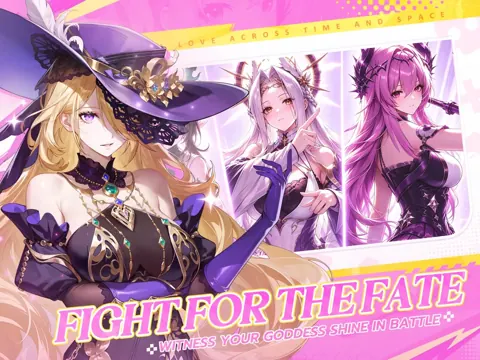
Girls Echo combines a fantasy RPG campaign with Goddess collection, idle progression, and character relationships. Its story brings the modern world into contact with Shenzhou, an ancient realm whose boundary is breaking down. Powerful Phantoms emerge as an older threat puts both worlds in danger.
For you, that means building a team that can handle tougher battles while developing relationships with its members between fights.
The release timeline puts older registration promotions into context:
| Event | Date or time | What it means for players |
|---|---|---|
| Pre-registration milestone promotion | October 1 | The campaign encouraged registrations toward launch rewards |
| Announced launch in UTC+7 | October 15 at 7:00 p.m. | The advertised opening time for that time zone |
| Announced launch in UTC-5 | October 15 at 7:00 a.m. | The same advertised opening expressed in UTC-5 |
| iOS version 1.0.2 update | October 15, 2026 | Language, text, and performance improvements |
Read those launch times with their stated UTC offsets. The 7:00 a.m. time specifically refers to UTC-5; it should not be read as a universal U.S. local time.
With the launch date behind us, start with the current download page for your device, then work through rewards and team setup.
Download Girls Echo on iOS or Android
Use the official mobile stores to find the correct game. Girls Echo has an iOS page under HOWLYO HONG KONG LIMITED and an Android page under HOWLYO GAME.
 Image: App Store / HOWLYO HONG KONG LIMITED
| Platform | Official download page | Publisher identification |
|---|---|---|
| iOS | Download Girls Echo on the App Store | HOWLYO HONG KONG LIMITED |
| Android | Download Girls Echo on Google Play | HOWLYO GAME |
If you arrived through an older Girls Echo pre register promotion, these store pages give you a direct route to the game. Match the title and publisher before downloading.
On iOS, version 1.0.2 includes improvements to language, text, and performance. Check the version information when reviewing the app so you can distinguish that update from the earlier launch promotion.
Once you enter the game, give team setup some attention before letting automatic combat carry you forward. Girls Echo supports automatic skill use and idle growth, but your character choices still determine what your squad brings into battle.
Start with these priorities:
- Look at each character’s role and element.
- Put together a complete squad rather than choosing only damage dealers.
- Review the recommended-team menu for composition ideas.
- Check login rewards and enter gift codes.
- Explore character interactions alongside combat.
The attraction is straightforward: you can collect animated Goddesses, build around their abilities, and deepen their relationships. Those relationships also contribute to battle strength, so spending time with a favorite character has a practical purpose beyond the story scenes.
Check Pre-Registration Rewards, Login Gifts, and Codes
Girls Echo pre register rewards belong to the milestone campaign that ran before launch. That promotion encouraged players to register and help reach a final milestone for launch rewards, alongside a separate giveaway.
 Image: App Store / HOWLYO HONG KONG LIMITED
Keep your reward checks organized. Milestone rewards, login gifts, and redeemable codes are different ways to receive items, and the launch campaign also includes paid offers. Review what each reward asks you to do before deciding where to spend your time or money.
Work Through the Login Campaign
The launch login campaign advertises up to 500 summons over seven days. Its rewards include summon tickets, with advanced summon tickets also appearing in the schedule.
Open the login reward screen and follow the displayed campaign requirements. Make claiming the available gifts part of your routine before moving into battles or character upgrades.
Spread-out rewards give you a reason to revisit your squad as new characters arrive. After summoning, compare each addition’s role and element with the team you already have.
Enter Launch Codes
Gift codes provide another way to collect Diamonds, Phantom EXP, and summoning items. Here are several launch-period codes to try:
| Code | Reward |
|---|---|
| GIRLSECHO | Diamonds ×200 and Phantom EXP ×50,000 |
| GE2026 | Diamonds ×1,000 |
| SVIP999 | Diamonds ×100 and Summoning Oath ×1 |
| VIP777 | Phantom EXP ×1,000 and Spirit Gear Enhancement Stone ×100 |
To redeem a code:
- Open Girls Echo.
- Tap your Profile icon in the upper-left corner.
- Select the Gift Code icon in the menu on the right.
- Enter the code exactly as written.
- Tap Confirm.
Check capitalization and remove accidental spaces when entering a code. If it fails, check whether you already redeemed it; expiration and redemption limits can also prevent a claim.
Use reward items with your team’s needs in mind. Phantom EXP supports character development, while summon rewards give you more options for assembling a squad. Review your roster after claiming them instead of overlooking a character who fills a missing role.
Build a Team That Works Together
Once the Girls Echo pre register question is settled, squad composition becomes the more useful focus. You can deploy up to five characters, with roles including Defender, Healer, and Attacker.
Automatic skills handle combat actions, but they still draw on the characters you selected. Check that your lineup includes ways to absorb damage, recover health, and defeat enemies.
Use the Element System
The elemental matchups include:
- Water beats Fire.
- Fire beats Wind.
- Wind beats Earth.
An elemental advantage adds 25% extra damage. Rising Star characters are exempt from additional elemental damage.
Check enemy elements before a difficult fight, and use favorable matchups when your roster supports them. Keep character roles in view as you make changes; swapping elements should still leave you with a functioning team.
Understand a Fire Team’s Roles
A beginner Fire composition brings together defensive support, healing, and burn damage:
| Character | Role or ability |
|---|---|
| Wukong | Tank who takes hits for the team |
| Winji | Fire support with healing and recovery |
| Nezha | Damage dealer who applies burn |
| Daiyou | Provides buffs and buff removal |
| Tamamo-no-Mae | Area damage dealer who applies burn to multiple enemies |
Use this composition to understand how abilities fit together. Wukong handles incoming pressure, Winji provides recovery, and the damage dealers contribute burn effects. Daiyou adds utility rather than simply filling another damage slot.
When reviewing alternatives, ask what the replacement actually contributes. Compare healing with healing, defensive coverage with defensive coverage, and damage effects with the rest of your squad’s abilities.
Read Battle Statistics Before Changing Everything
After a battle, review character damage and support contributions. Those results help you see how the team performed beyond the victory screen.
If your squad struggles, inspect its roles and development together:
- Check whether your defensive character can withstand incoming attacks.
- Review healing and support contributions.
- Look for elemental disadvantages.
- Upgrade the characters you plan to keep using.
- Revisit equipment and star upgrades.
Character development includes leveling, equipment, and star upgrades. Increasing stars also improves skills, giving you another reason to examine the characters already in your roster.
Use recommended compositions as a starting point, then compare their roles with the characters you own. The goal is to understand why a lineup works well enough to make useful substitutions.
Make Idle Progress and Character Bonds Part of Your Routine
Girls Echo pre register promotions introduce the game’s rewards, but its longer-term loop combines combat, offline growth, and relationships.
Your allies continue growing while you are offline. Adventure progress also increases hourly rewards, connecting campaign advancement with idle progression.
Work on the campaign alongside your team rather than focusing entirely on summons. After a difficult stage, review battle statistics, improve the squad, and return with a clearer idea of what needs to change.
Spend Time With Your Goddesses
Character interactions deepen relationships, reveal additional story moments, and unlock exclusive endings. Stronger bonds also increase combat strength.
Give gifts a character likes and pay attention to familiarity. Relationship progress can unlock potential, team power, attack power, and voice lines.
Choose a favorite to interact with regularly, especially when that character is also part of your active squad. This lets you explore the personal story while developing a character you use in battle.
Prepare for More Than One Team
Girls Echo includes adventure battles, competitive modes, and tower climbing. Higher tower stages expand from single-team challenges into two-team and three-team battles.
Develop additional characters with those modes in mind. Keep track of spare Defenders, Healers, and damage dealers so you can assemble more complete squads as the challenges expand.
Before ending a session, claim available login gifts, review your active team’s upgrades, and spend some time on character bonds. That routine connects the launch rewards with the systems you will keep using.
FAQ
Is Girls Echo pre register still the right place to start?
The announced launch date was October 15. Start with the official App Store or Google Play download page, then check the game’s login campaign, gift codes, and available launch rewards.
What platforms is Girls Echo available on?
Girls Echo has official pages on the Apple App Store and Google Play. The iOS seller is HOWLYO HONG KONG LIMITED, and the Android developer is HOWLYO GAME.
How do I redeem Girls Echo gift codes?
Tap your Profile icon in the upper-left corner, select Gift Code from the menu on the right, enter the code, and press Confirm. Enter capitalization exactly as shown and remove extra spaces.
Does Girls Echo have idle progression?
Yes. Your allies grow while you are offline, and advancing through adventure increases hourly rewards. Combat also supports automatic skills. Keep developing your team’s roles, equipment, and character bonds alongside that idle growth.
Continue with
 Girls Echo Release Date: Launch Time and How to PlayCheck the Girls Echo release date, global launch times, Android and iOS downloads, and practical tips for summons, team building, and your opening session.
More in Release
See all Release
Quick links

Girls Echo Codes (October 2026): Free Rewards Guide
Redeem Girls Echo codes for Diamonds, summon items, and upgrade materials. Get October 2026 code list, redemption steps, and tips for building your team.

Girls Echo Beginner Guide: 12 Tips for a Strong Start
Use this Girls Echo beginner guide to build your team, manage summons, level five core characters, and collect daily rewards for a stronger start today.

Girls Echo Tier List: Best Characters and Team Picks
Use this Girls Echo tier list to compare characters, choose powerful tanks and healers, and build better teams around your duplicates and key synergies.
Girls Echo Account Recovery: Find Your Original Login
Girls Echo account recovery starts with your login and server. Follow the account-switching steps, avoid reroll resets, and check your original progress.
Join the community
Official channels for news, updates and player help: